
Description
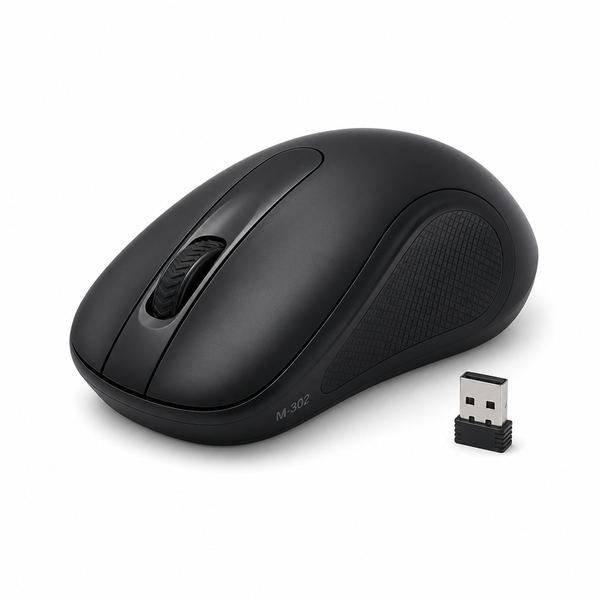
Calus M-302 Wireless Mouse For Daily Use On Laptop
A good mouse can make your daily use of the computer a bit more comfortable, whether you’re working with documents, surfing the web, doing schoolwork, running your business or just navigating applications. The Calus M-302 Wireless Mouse is for those users who want the convenience of wireless connectivity but don’t want the hassle of a traditional mouse cable.
If you are in Lusaka and want a wireless mouse for laptop use for your daily computing needs, the Calus M-302 is a practical pick to consider.
The wireless design allows users to have more freedom around their workspace, and helps to keep the desk area cleaner and less cluttered. It is usable at home, in the office, at school or other day-to-day computing environments.
Why Calus M-302 Wireless Mouse?
A laptop comes with an integrated touchpad, but some users like to use a physical mouse for more accurate and comfortable navigation. A mouse can be very handy when you are working for long periods, editing documents, surfing from Web page to Web page, organising files or doing other routine office work.
The Calus M-302 is an easy alternative to the traditional wired mouse. Wireless design gives you more freedom of movement No more worries about a cable running across your work space.
If you are a user comparing the computer mouse wireless price of various options, it is also good to keep in mind the mouse’s intended purpose, compatibility, comfort, and everyday usability instead of just considering the price.
A Handy Option for Laptop Users
You may look at the M-302 if you want a mouse for everyday laptop work like:
Web surfing
Editing of the document
Office Job
Distance learning
File handling
Computer navigation in general
Home computers
Business activit ies
Productivity Everyday
If you’re using a laptop for work, school, entertainment or just personal use, a separate mouse can be an alternative to the built-in trackpad.
Wireless Mouse Parts and Their Functions
Before purchasing any computer mouse, it can be helpful to understand the basic wireless mouse parts and what they do.
Physical buttons, a scroll wheel, an optical or tracking sensor, electronic components inside, and a wireless communication system are typical of a wireless mouse. Depending on the model, the package may also contain accessories necessary for operation.
Because exact hardware configurations may differ between models and production runs, customers should verify current specifications with Zam Zone Mobiles or check the product packaging before purchase.
So you should select the Calus M-302 according to the purpose you want to use it and check the specification for the stock you have.
What is the M-302 Wireless Mouse Operation for?
The M-302 wireless mouse work is best described in terms of day-to-day computing tasks. Wireless mice give you a physical control to select, open, drag, scroll and interact with items on screen, making it easier to navigate your laptop.
For example, an office worker may benefit from a mouse when working with documents and spreadsheets. Students can use one for online classes, research, presentations and assignments. For home users, the presence of a dedicated pointing device will be appreciated for browsing and general computer work.
The mouse can also be useful when a user just prefers the feel and control of a physical mouse to a laptop touchpad.
Wireless Comfort for Your Workspace
Convenience is one of the main reasons people choose wireless peripherals. A wireless mouse can help make a cleaner workspace as there’s no traditional mouse cable leading out of the laptop across the desk.
This can be especially useful for people who are prone to moving their laptop around a lot. Users are no longer constrained by the length of a cable, and can place the mouse where it fits in their workspace.
This can also make the entire laptop setup more flexible for students and professionals working from different locations.
Best Wireless Mouse for MacBook?
If you’re using an Apple computer, you might be looking for the best wireless mouse for Mac, but it’s always worth checking it’s compatible before you buy.
Which “best” is determined by the user’s computer, OS, desired features, comfort requirements, and intended workload. Before purchasing for a Mac device, ensure to check the current product specifications and connection requirements of the Calus M-302.
If you are not sure if the M-302 is compatible with your laptop or computer, contact Zam Zone Mobiles for product details before purchasing.
Selecting the right wireless mouse
When buying a wireless mouse, you should pay attention to several things other than the name of the product.
Compatibility with Devices
Verify that the mouse connecting method is compatible with your laptop/computer. Different wireless peripherals may use different connection technologies so it is worth checking compatibility
Purpose of Use
Consider what you’ll be using the mouse for. Basic browsing and office work require different things than professional design, gaming or other specialised applications.
Comfort level
If you are a mouse user for several hours a day, the physical design and feel can affect the overall experience. Choose a design that feels comfortable in your hand and in your normal working position.
Portability
People using laptops usually travel between home, office, school, etc. A small wireless setup can be handy if you are always dragging your computer accessories around.
Features available
Look at the functions you really need. For general laptop use, a simple mouse may be enough, but specialist users may need extra buttons or advanced tracking features.
Why Purchase from Zam Zone Mobiles
Zam Zone Mobiles offers online shopping and retail outlets to customers in Lusaka, Zambia. The store sells mobile phones, accessories, computer related products and everyday technology solutions products.
When you buy a computer accessory, it can be nice to buy locally. Customers can ask questions about the product, check availability and know the specs before buying.
To know the price of a computer mouse wireless in Zambia, contact Zam Zone Mobiles to find out the availability and prices of the products on offer.
Calus M-302 Wireless Mouse Specification Table
| Specification | Details |
|---|---|
| Product Name | Calus M-302 Wireless Mouse |
| Product Type | Wireless Mouse |
| Model | M-302 |
| Primary Use | Laptop and Computer Navigation |
| Connectivity | Wireless — exact connection method should be confirmed |
| Compatibility | Please confirm compatibility with your specific device |
| Tracking Technology | Not Provided |
| Number of Buttons | Not Provided |
| Scroll Wheel | Not Provided |
| Battery Type | Not Provided |
| Colour | Not Provided |
| Dimensions | Not Provided |
| Weight | Not Provided |
| Warranty | Please confirm with Zam Zone Mobiles |
| Availability | Subject to current stock |
| Store Location | Lusaka, Zambia |
Note: Specifications not included are intentional omissions. Specifications may vary between models, manufacturing batches or regions. Please check with Zam Zone Mobiles for current specs before purchase.
Pros and Cons
Pros
Wireless design – fewer cables to clutter the space
Ideal for daily laptop and computer navigation.
Great for office, study, or home use
Laptop setup is mobile
Useful alternative for a laptop’s trackpad
Available at the local technology store in Lusaka
Cons
Check the exact technical specifications before buying.
Check for compatibility with your intended device
The product information we have access to does not show any advanced features.
Final Words
The Calus M-302 Wireless Mouse is a useful wireless device for users who want an alternative to the laptop’s built-in touchpad. Wireless design can help to create a cleaner, more flexible workspace for everyday computing.
It can be a good fit for students, office workers, remote employees, home users, and anyone that prefers to use a physical mouse on their laptop.
If you are in Lusaka and looking for a wireless mouse for your laptop, the Calus M-302 is a good one to consider. Availability and offerings are subject to change by model and region. Please verify latest product details from Zam Zone Mobiles before you buy.
Looking for more info? Zam Zone Mobiles Lusaka Zambia Check Availability, Compatibility & Latest Price.
Common Questions
Calus M-302 Wireless Mouse is?
The Calus M-302 is a wireless computer mouse for everyday computer and laptop navigation. Useful for browsing, office work, studying and general computing.
Is Calus M-302 wireless mouse for laptop computer?
Yes, the M-302 is a wireless mouse designed for daily use with a laptop or PC. Consumers should be sure to check what the connection needs are and if the device is compatible.
Is Calus M-302 compatible with Mac?
Please check compatibility prior to purchase. You’re looking to see what Mac connection options are available and then compare that against the M-302’s current specs to figure out the best wireless mouse for Mac.
Parts of a wireless mouse?
A wireless mouse usually consists of buttons, a scroll wheel, a tracking sensor, electronic components and a wireless connection system. Exact parts may vary from models.
How much does a computer wireless mouse cost in Zambia?
Price may vary depending on stock and market conditions at time of purchase. Buy the best wireless computer mouse price in Lusaka, Zambia at Zam Zone Mobiles.
Suitability of M-302 for office work?
A wireless mouse is useful when doing everyday office work like surfing the net, editing documents, file management and general computer navigation.
Is calus M-302 bad for students?
Yes it is suitable for daily student jobs like research, online learning, document work, presentations and general laptop use.
Is it possible to bring my laptop on the M-302?
A wireless mouse is also convenient for a portable laptop, as it does not require a conventional mouse cable. Whether it is portable or not depends on the user’s setup and storage needs.
Where to purchase Calus M-302 in Lusaka?
Zam Zone Mobiles, a mobile and technology retailer serving customers in Lusaka, Zambia, stocks the Calus M-302 Wireless Mouse. Please check stock before coming in or ordering.
How to Contact Zam Zone Mobiles M-302?
Call us Zam Zone Mobiles to know the latest price, availability, compatibility and product specification before placing an order.

Reviews
There are no reviews yet.